Dataset Demo: GR00T-N1.5 on AgiBotWorld
Running the GR00T‑N1.5 Pretrained Model on the AgiBotWorld 2026 Dataset with RAIL
Complete deployment pipeline: source code download, dataset preparation, AV1-to-H.264 video transcoding, multiple configuration modifications, server/client startup. All
Path/To/xxxplaceholders in this document must be replaced with the real absolute paths on your machine.
0. Download the RAIL Source Code
RAIL source code local path: Path/To/RAIL
1. Download the AgiBotWorld 2026 Data Subset
Download the archive: https://huggingface.co/datasets/agibot-world/AgiBotWorld2026/blob/main/ImitationLearning/Home/task_4713/509995_510027.tar.gz
Save it to the local path: Path/To/Dataset/509995_510027
2. Dataset Preprocessing: Batch-Transcode AV1-Encoded MP4s to H.264
Extract 509995_510027.tar.gz.
The original videos are AV1-encoded, which OpenCV/Git-LFS cannot read properly, so they need to be transcoded to the H.264 format.
Enter the directory: Path/To/Dataset/509995_510027/data/videos/chunk-000, and create the script transcode_video.sh:
#!/bin/bash# List of camera directories under Path/To/Dataset/509995_510027/data/videos/chunk-000cam_dirs=("observation.images.hand_left""observation.images.hand_right""observation.images.head_back_fisheye""observation.images.head_left_fisheye""observation.images.head_right_fisheye""observation.images.top_head""observation.images.head_depth")for cam in "${cam_dirs[@]}"; do if [ ! -d "$cam" ]; then echo "Skip $cam : directory not exist" continue fi echo "==== Process camera dir: $cam ====" # Recursively find all episode_*.mp4 files find "$cam" -type f -name "episode_*.mp4" | while read -r mp4file; do tmpfile="${mp4file}.tmp_transcode.mp4" echo "Transcode: $mp4file" ffmpeg -i "$mp4file" -c:v libx264 -crf 15 "$tmpfile" -y -hide_banner -loglevel error if [ $? -eq 0 ]; then mv "$tmpfile" "$mp4file" echo "OK replaced: $mp4file" else echo "FAILED transcode $mp4file , keep original" rm -f "$tmpfile" fi donedoneecho "All done"Run the transcoding script:
chmod +x transcode_video.sh./transcode_video.sh3. Download the GR00T N1.5 Source Code
Branch: n1.5-release
Repository: https://github.com/NVIDIA/Isaac-GR00T/tree/n1.5-release
Save it to the local path: : Path/To/Project/Isaac-GR00T-N1.5
4. Download the GR00T-N1.5-3B Pretrained Weights
Weight repository: https://huggingface.co/nvidia/GR00T-N1.5-3B
Save it to the local path: Path/To/CheckPoint/GR00T-N1.5-3B
5. Modify the RAIL Robot Configuration
File path: Path/To/RAIL/conf/robots_conf.py (lines 704-706), modify the get_mock_config() function:
def get_mock_config():    """Generate configuration for mock robot (simulation/testing).
    Returns:        ConfigDict: Configuration dictionary containing camera mappings, data root path, and repository ID for mock robot.    """    config = ConfigDict()    config.camera = ConfigDict()    # config.hand_type = 'gripper' # 'gripper' or 'hand_as_gripper' or 'hand'    config.camera.ref = 'head'    config.camera.names = {'head': 'observation.images.head_rgb',                'hand_left': 'observation.images.left_wrist_rgb',                'hand_right': 'observation.images.right_wrist_rgb'}    config.action_layout = _ordered_config({        'arm': {            'start': 0, 'end': 14, 'policy': 'gradual',            'presets': {                'left': {'Default': [0.0] * 7, 'Custom': [0.0] * 7},                'right': {'Default': [0.0] * 7, 'Custom': [0.0] * 7},            },        },        'gripper': {            'start': 14, 'end': 16, 'policy': 'stepwise',            'presets': {                'left': {'Default': [0.0], 'Custom': [0.0]},                'right': {'Default': [0.0], 'Custom': [0.0]},            },        },        'head': {            'start': 16, 'end': 18, 'policy': 'gradual',            'presets': {                    'left': {'Default': [0.0]*2, 'Custom': [0.0]*2},                    'right': {'Default': [0.0]*2, 'Custom': [0.0]*2},            },        },        'waist': {            'start': 18, 'end': 20, 'policy': 'gradual',            'presets': {                    'left': {'Default': [0.0]*2, 'Custom': [0.0]*2},                    'right': {'Default': [0.0]*2, 'Custom': [0.0]*2},            },        },        'velocity': {            'start': 20, 'end': 22, 'policy': 'gradual',            'presets': {                    'left': {'Default': [0.0]*2, 'Custom': [0.0]*2},                    'right': {'Default': [0.0]*2, 'Custom': [0.0]*2},            },        },    })    config.manual_arm_interval = 0.01    config.state_action_range = [[0, 16], [58, 70]]    config.dataset_path = '/path/to/dataset'    # config.dataset_path = '/path/to/dataset'    return config
6. Modify the RAIL Model Configuration
File path: Path/To/RAIL/conf/models_conf.py (lines 36-37), modify get_gr00t_config() to set the embodiment tag and the data processing key:
def get_gr00t_config():    """Generate configuration for GR00T model.
    Returns:        ConfigDict: Configuration dictionary containing model path for GR00T.    """    config = ConfigDict()    config.model_path = '/path/to/model'    config.embodiment_tag = 'agibot_genie1'    config.data_config_key = 'agibot_genie1'    return config
7. Modify the Data Configuration in the GR00T Source Code
File path: Path/To/Project/Isaac-GR00T-N1.5/gr00t/experiment/data_config.py (lines 704-706),
modify the video_keys of the AgibotGenie1DataConfig class:
class AgibotGenie1DataConfig(BaseDataConfig): video_keys = [ "video.cam_top_head", "video.cam_left_wrist", "video.cam_right_wrist" ] ......8. Modify the Metadata Configuration Inside the Weights
File path: Path/To/CheckPoint/GR00T-N1.5-3B/experiment_cfg/metadata.json (lines 1933-1959),
locate agibot_genie1 → modalities → video, and modify the camera-related indices and parameters:
"agibot_genie1": { ......, "modalities": { "video": { "cam_top_head": { "resolution": [ 640, 640 ], "channels": 3, "fps": 30.0 }, "cam_left_wrist": { "resolution": [ 640, 640 ], "channels": 3, "fps": 30.0 }, "cam_right_wrist": { "resolution": [ 640, 640 ], "channels": 3, "fps": 30.0 } } }}9. Start the RAIL Server
In one terminal (with the virtual environment activated by default), start the RAIL server:
PYTHONPATH=Path/To/Project/Isaac-GR00T-N1.5:$PYTHONPATH python run_server.py --model_type gr00t_n1_5 --model_path Path/To/CheckPoint/GR00T-N1.5-3B10. Start the RAIL Client
Open a new terminal (with the virtual environment activated by default) and start the RAIL client:
python run_web_client.py11. Configure the Dataset Path on the Web Page
Access in a browser: http://localhost:9000
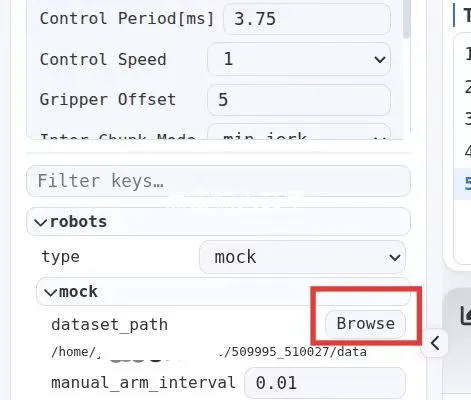
Click Browse, and change robots-mock-dataset_path on the left side to the actual dataset path:
Path/To/Dataset/509995_510027/data
12. Start Inference
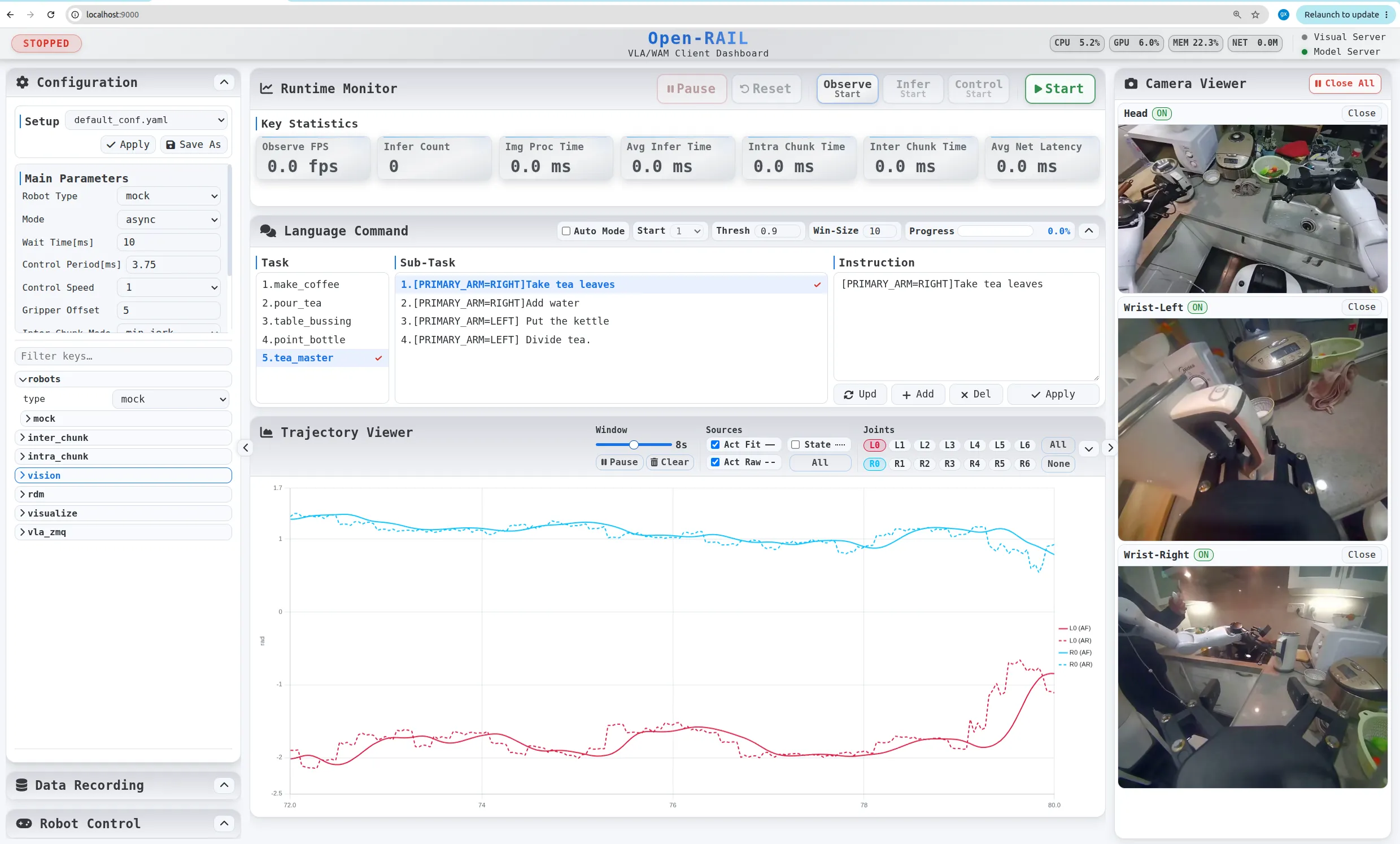
Click the Start button on the top bar of the page to run inference on the AgiBotWorld2026 subset.
Key Notes
- All
Path/To/xxxmust be replaced with real absolute paths on your machine; - The videos must be transcoded from AV1 to H.264, otherwise OpenCV will fail to read them;
- Make sure to add the GR00T-N1.5 source directory to
PYTHONPATH, otherwise class loading via trust_remote_code will fail; metadata.jsonis an internal file of the pretrained weights; it is recommended to back up the original file before modifying it.